How to block websites on a Mac
For a free Safari restriction, use Screen Time's restricted-site list. For a block you cannot cancel before its timer ends, consider SelfControl. For a notice that lets you leave or continue, use Selenar. Choose the behavior you need before setting a rule.
Choose a website blocker for the task
Swipe sideways to see every column →
| Option | What you set | What happens |
|---|---|---|
| Screen Time | Restricted websites or an allowed-only list in macOS. | Restricts access using Apple's web-content controls. Apple's macOS 15 and 26 guide labels this setting Safari. |
| SelfControl | A blocklist and a timer. | Its maker says the block lasts until the timer ends, including after restarting or deleting the app. |
| Selenar | An exact site, app or content category. | Recognises the current window locally and offers a choice. You can continue or quit. |
A timed lock fits a session when you want access refused even if you change your mind. Selenar fits a boundary you want to reconsider deliberately. It does not prevent every page from loading.
Restrict a site in Safari with Screen Time
Check your version under Apple menu, About This Mac. These steps follow Apple's versioned documentation. To restrict Reddit, for example, use https://www.reddit.com as the website URL.
macOS Sequoia 15 and Tahoe 26
- Open System Settings, then Screen Time. If Screen Time is off, set it up for yourself first.
- Open Content & Privacy and turn it on. Open App Store, Media, Web & Games.
- Under Safari, choose Limit Adult Websites, then Customize. This also applies adult-site filtering.
- Use the add button under Restricted, enter the website URL, then click Done. Open that URL in Safari to check the result.
For a short list of permitted work sites, choose Allowed Websites Only instead and edit that list. To undo a single restriction, remove its URL from Restricted. See Apple's macOS 15 restrictions setup, macOS 15 web settings and macOS 26 web settings.
macOS 27
Apple's macOS 27 guide uses a different route. Open System Settings, Screen Time, Apps & Websites, then Restrictions. Under Websites, open Filtering. Select Limit Adult Websites and Customize to enter restricted sites, or Approved Websites Only for an allowlist.
Check the blocked destination and a site you need after changing the setting. For a Chrome workflow, check the same URL in Google Chrome too. The Safari label in Apple's older guide does not establish Chrome coverage.
Set a free timed block with SelfControl
SelfControl is free and open source. Add the unwanted sites to its blocklist, choose a duration, then click Start. Before starting, keep your work's login, research and communication sites available.
Its published behavior is deliberately strict. The maker says you cannot access those sites until the timer expires, even after a restart or deleting SelfControl. Start with a short session and check a needed site before committing to a longer one.
Use Selenar when you want a choice
For a writing session with Reddit as the unwanted destination, keep your editor open and add an exact site rule. An exact rule catches the destination you name; a Social Media category rule can recognise matching visible content on sites you did not list.
- Check compatibility and permissions. Selenar needs Apple silicon and macOS 15 or later.
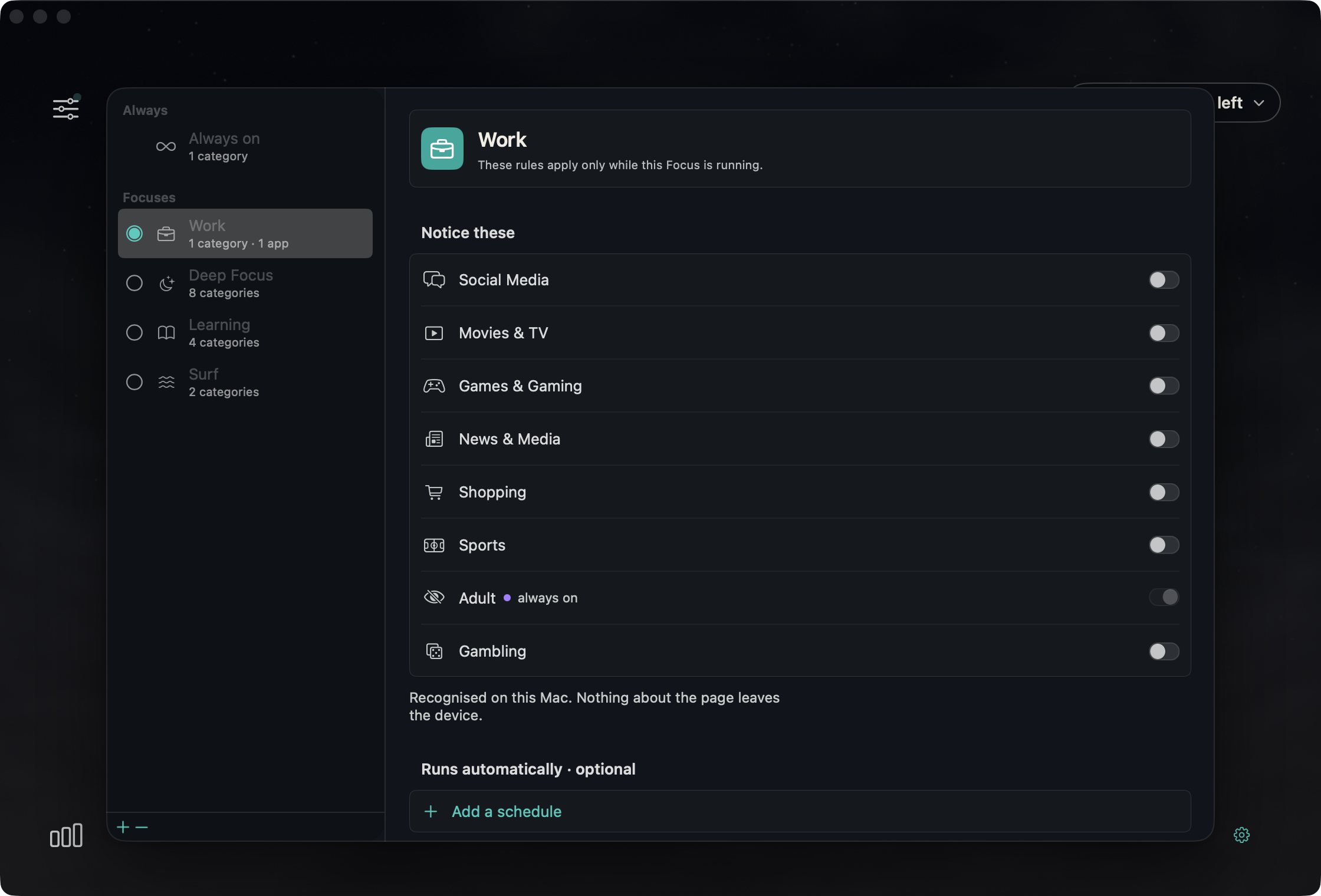
- Open Rules and click a Focus row to edit it. Under Sites · optional, enter
reddit.comand select Add. Use Always on instead if you want the rule whenever Selenar runs. - For a Focus, select its circle or use the row's right-click action, Use this Focus. Return to Home, click the moon and choose Start.
- Open Reddit in Safari or Google Chrome, then return to your editor. Check that the unwanted destination gets a notice and your needed work remains usable.
Swipe sideways to inspect every switch →
The first notice lets you Leave it or Continue for 10 minutes. Leave attempts to close a matching Safari or Google Chrome tab with Automation access, or hide the matched app or an unscriptable browser. It holds the category or exact target for 15 minutes. A matching return during the hold attempts that action before a held notice appears. Closing or hiding can fail when access is unavailable.
Recognition runs fully on your Mac, with no cloud AI or external AI API calls. Observed screenshots, window text, page addresses, titles and browsing content are not uploaded. Downloads, checkout, licence email, updates and this website's analytics use online services. Privacy details.
Apple silicon, macOS 15 or later. Seven days of use free, counted only on days Selenar is watching. US$19 once includes one year of updates. New purchases have a 14-day refund window from purchase.
Check compatibility before downloading.
Buy Selenar for US$19. Gumroad shows local currency and applicable taxes.
Questions about browser and device coverage
Can I use Selenar in Safari and Chrome?
Yes, Safari and Google Chrome are the supported browsers for optional page context and tab closing through Automation. Accessibility reads the current window's text; optional Screen Recording covers windows without accessible text. Other browsers have less context. Recognition can miss or misread a page.
Does this also block a phone or every device on my network?
This guide sets up one Mac. It does not configure your router or a phone. Check each device separately. Selenar has no phone companion and watches the current Mac window rather than filtering your network.
Can I undo a Selenar rule or continue?
You can edit or remove your rules, stop a Focus or quit Selenar. Continue allows 10 minutes. If you move elsewhere before that time ends, expiry is quiet; monitoring resumes and a later matching visit can get another notice. For an exact-rule error, This rule is wrong exempts that rule at the current site or app for 24 hours. Wrong call is the category correction and exempts that category at the site or app for 24 hours.